What Is an Adjustable Footstool and Why Use One?
An Adjustable Footstool is a small ergonomic tool with a surprisingly practical purpose. It supports the feet when a chair, desk, or user’s height does not align comfortably. OSHA’s Computer Workstations eTool recommends a footrest when feet cannot rest flat on the floor. That guidance reflects a simple principle: stable lower-body support can improve sitting posture and reduce pressure behind the knees.
The value becomes clearer during a long workday. Imagine a user’s toes touching the floor while the heels remain suspended. The legs may feel tense, and the pelvis can slowly slide forward. An Adjustable Footstool allows the user to change height, tilt, and sometimes surface angle. These adjustments can support different leg lengths, desk heights, and working positions. The Canadian Centre for Occupational Health and Safety also identifies footrests as useful when workstation dimensions prevent comfortable foot placement.
Small adjustment. Noticeable comfort.
Professional ergonomics guidance does not claim that a footstool solves every posture problem. Chair depth, monitor height, movement breaks, and individual health conditions still matter. This is where product advice can become too confident. A footstool may help one person and feel restrictive to another. The best choice usually comes from testing it under a real desk, with shoes worn and feet relaxed.
This guide explores what an Adjustable Footstool is, how its mechanism works, and when it deserves a place in a workstation. It also considers materials, stability, cleaning, and everyday usability. Evidence matters, but so does lived experience. A useful footstool should disappear into the routine, not become another object requiring constant attention.
Definition and Core Features of an Adjustable Footstool
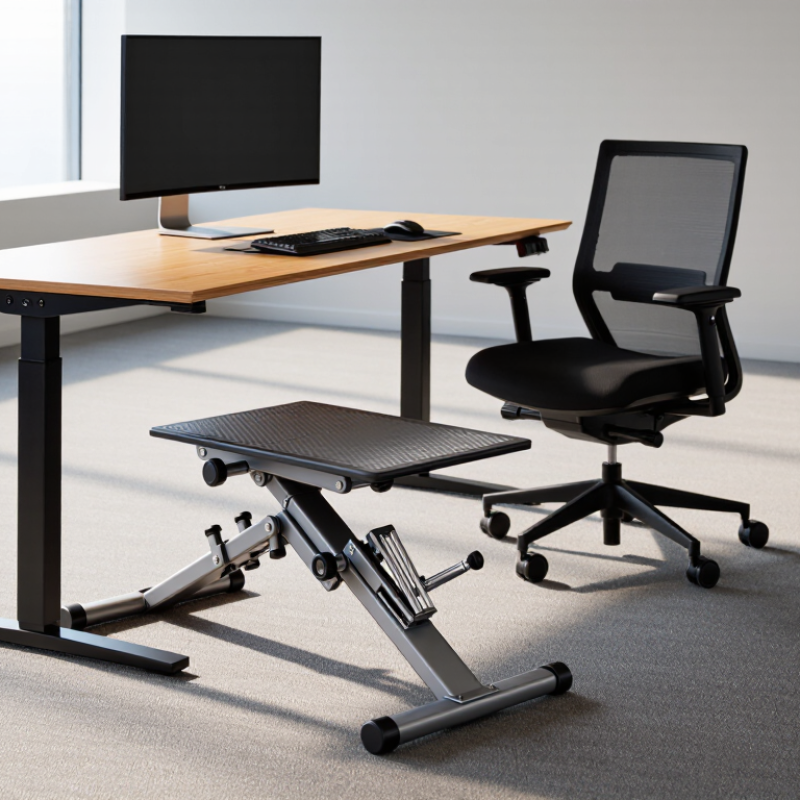
An adjustable footstool is a small support platform designed to raise and position the feet comfortably. Unlike a fixed stool, it allows users to change its height, angle, or both. This flexibility helps match different chairs, desks, and body proportions.
The core feature is a secure adjustment system. It may use locking pins, threaded controls, or stepped height settings. A stable base matters just as much. Wide feet, a firm platform, and rubber grips can reduce slipping on smooth floors. The top surface should provide enough room for both feet without feeling cramped. A textured finish can improve control, especially when wearing socks.
Comfort depends on more than height. The platform should keep the feet supported without forcing the knees upward. A slight tilt may help some users maintain a relaxed ankle position during desk work, reading, or sewing. However, too much tilt can create pressure under the feet. Small changes work better than dramatic adjustments.
Measurements should be checked carefully. A useful range is not automatically suitable for every person. I have found that a footstool can feel helpful at one desk but awkward at another. The chair height, desk clearance, and flooring all affect performance. Weight capacity and adjustment security deserve equal attention. A smooth mechanism is convenient, but it should never replace a dependable lock.
How Adjustable Footstools Work
What Is an Adjustable Footstool and Why Use One?
How Adjustable Footstools Work
An adjustable footstool changes height, angle, or both to support different sitting positions. Most models use telescoping legs, sliding platforms, or locking hinges. A simple pin, knob, or lever holds the selected setting securely. The mechanism should move smoothly without wobbling. Stability matters more than a large adjustment range.
Under a desk, the footstool raises feet that cannot rest comfortably on the floor. This can reduce dangling legs and help keep the knees near hip level. A tilted platform may also support the soles during long periods of sitting. Small changes can feel surprisingly noticeable. However, the correct setting depends on chair height, desk clearance, and body proportions.
Set the stool low at first. Place both feet flat, then adjust until your knees feel relaxed. Check that the front edge does not press sharply into your legs. Test the lock before shifting your weight. It should stay fixed.
One limitation deserves attention. An adjustable footstool cannot correct every seating problem. A poorly fitted chair may still cause pressure or slouching. In addition, some platforms encourage constant foot movement, which may distract certain users. Recheck the position after a few minutes, because the first setting is not always the best one. If discomfort continues, review the entire workstation rather than blaming the footstool alone.
Different Types and Adjustment Mechanisms
An adjustable footstool supports the feet when a chair leaves them dangling. It can reduce pressure behind the knees and help maintain a more stable sitting position. The U.S. Bureau of Labor Statistics’ 2023 American Time Use Survey reports that employed Americans worked about 7.7 hours on an average workday. Small posture problems can become noticeable during long sessions.
Different designs suit different needs. A fixed platform offers simple, steady support. A tilting footstool uses a hinge or rocking base, allowing gentle ankle movement. This may feel comfortable, but excessive rocking can reduce stability. Height-adjustable models usually use screw threads, telescopic legs, ratchets, or gas-assisted mechanisms. Screw systems provide precise changes. Telescopic legs adjust faster. Ratchet systems often feel firmer, though their steps may be too large for some users. OSHA’s Computer Workstations eTool recommends supported feet when the chair height prevents contact with the floor. That guidance is useful, but a footstool is not a magic fix. Desk height and seat depth still matter.
Tips: Adjust the stool until your thighs stay level and your knees remain near a right angle. Keep both feet supported, not just your toes. Test the highest and lowest settings while wearing normal shoes. A textured surface helps prevent slipping. I have found that a slightly angled platform often feels better than a perfectly flat one, but personal comfort can mislead. If numbness, swelling, or persistent pain appears, reassess the whole workstation rather than raising the stool again.
Benefits of Using an Adjustable Footstool
What Is an Adjustable Footstool and Why Use One?
An adjustable footstool supports the feet while you sit at a desk, counter, or workstation. Its height, angle, or surface can change to match your body and chair. During practical workstation assessments, this small adjustment often helps shorter users keep both feet supported. That matters when the chair must be raised for proper desk height. OSHA’s Computer Workstations eTool recommends foot support when feet cannot rest flat on the floor. A stable footstool can also reduce dangling legs, pressure behind the knees, and constant repositioning.
The benefits extend beyond comfort. Supported feet may help the pelvis stay more balanced, allowing the back to contact the chair. The U.S. Bureau of Labor Statistics reported that musculoskeletal disorders made up 27% of days-away-from-work cases in 2023. A footstool cannot prevent every injury. It is not a medical treatment. Still, it can remove one avoidable source of strain during long sitting periods. Choose a broad, non-slip platform. Adjust it until your knees sit near hip level and your feet remain fully supported. Test it for ten minutes, then reassess. Some users prefer a slight tilt; others find it distracting. That difference is easy to overlook.
How to Choose and Use the Right Adjustable Footstool
What Is an Adjustable Footstool and Why Use One?
An adjustable footstool supports your feet when a chair feels too high. It can reduce dangling legs, knee pressure, and unstable posture. OSHA workstation guidance recommends foot support when your feet cannot rest comfortably on the floor. This matters in home offices, where BLS reported that 22.6% of employed people worked from home on an average day in 2023. A footstool is not a cure for prolonged sitting. WHO guidelines still encourage adults to limit sedentary time and move regularly.
How to Choose and Use the Right Adjustable Footstool
Choose a platform wide enough for both feet. Your knees should remain near hip level, with thighs mostly horizontal. Look for height adjustment, a non-slip surface, and a stable base. A slight tilt may feel comfortable, but extreme angles can push your knees upward. Adjust the stool until your feet feel supported without lifting your shoulders or sliding forward. Fit matters more.
Test it for one work session. Check your heels after thirty minutes. Are they relaxed, or are you pressing down? Keep the stool close to the chair, and change position regularly.
I once assumed a taller platform would improve comfort; it actually narrowed my knee angle. That mistake is easy to repeat. Ergonomic recommendations are useful, but individual bodies differ.
Reassess the setup after a few days, especially if you notice numbness, swelling, or persistent pain. EPA workplace guidance also supports changing posture and taking movement breaks, rather than relying on one accessory.